To create a TAU launch configuration, click the profile button added near the run and debug buttons. This will provide a list of standard and parallel C, C++ and Fortran run configurations similar to those provided by the standard run configuration window. You may select a pre-existing run configuration or create a new one in the usual way.
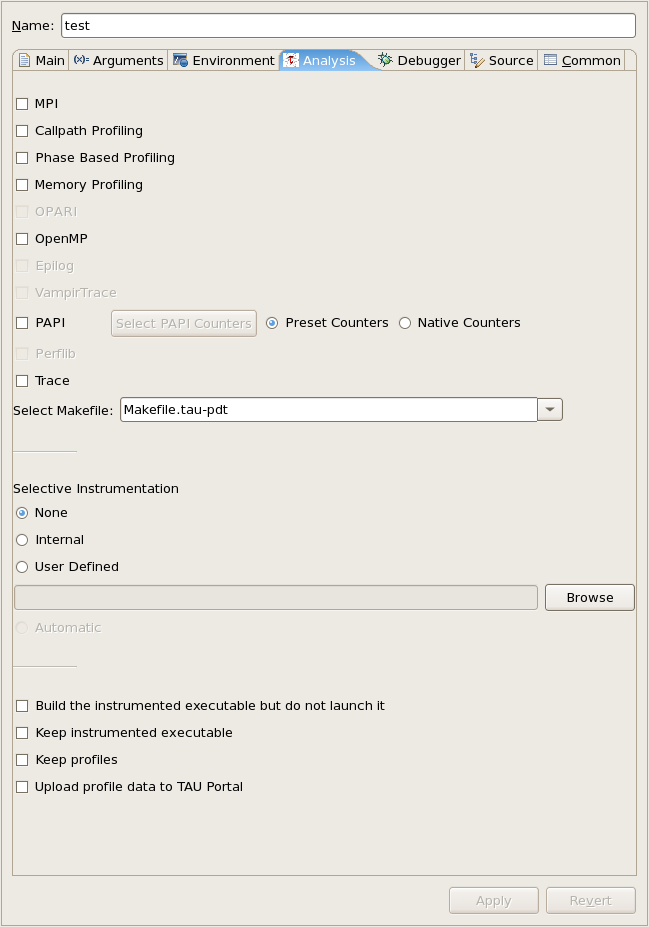
The run configuration options are equivalent to those of a standard run
configuration, with the addition of a performance analysis tab. You must select
a Tau makefile from the available makefiles in the Tau architecture directory
you specified. You may select specific configuration options to narrow the list
of makefiles in the dropdown box. Only makefiles configured with the
-pdt
option will be listed.
If you select a makefile with the Papi counter library and
-MULTIPLECOUNTERS
enabled you may specify the Papi environment variables using the Select Papi
Counters button. The counters you select will be placed in the environment
variables list for your run configuration.
You may specify the use of TAU selective instrumentation either by selecting a pre-defined selective instrumentation file, or by selecting the internal option to have Tau to use a file generated by the selective instrumentation commands available in the Eclipse workspace.
By default TAU profile data will only be stored in the default perfdmf database, if available. You may specify that performance data should be kept on the file-system. You may also specify that a Tau instrumented executable should not be deleted after it is built and run, or that it should not be run at all. These options will leave a new TAU specific build configuration available for your use. It will have the name of the original build configuration, with the tau configuration options used appended. The executables available in such build configurations can be run through the standard run and debug launch configurations. These options can be useful if you need to launch Tau instrumented binaries outside of eclipse.